How to run anything as a service
Caloni, 2008-05-27 computer english blogUpdate 2026-02-20: Many years ago I switched from this solution to NSSM, which I highly recommend. It has been used in robust products and avoids having to maintain redundant code to support programs that weren't designed to be services, but need to run independently of the user's account.
The biggest advantage running an application as a service, interactive or not, is to allow its start before a logon be performed. An example that happens to me is the need of debugging a GINA. In order to do this, I need the Visual Studio remote debugger be started before logon. The easiest and fastest solution is to run Msvcmon, the server part of debugging, as a service.
Today I've figured out a pretty interesting shortcut to achieve it.
An Alex Ionescu article talks about this command line application used to create, initiate and remove services. Even not being the article focus, I found the information pretty useful, since I didn't know such app. Soon some ideas starting to born in my mind:
"What if I used this guy to run notepad?"
Well, the Notepad is the default test victim. Soon, the following line would prove possible to run it in the system account:
sc create Notepad binpath= "%systemroot%\NOTEPAD.EXE" type= interact type= own
However, as every service, it is supposed to communicate with the Windows Service Manager. Since Notepad even "knows" it is now a superpowerful service, the service initialization time is expired and SCM kills the process.
>net start notepad
The service is not responding to the control function.
More help is available by typing NET HELPMSG 2186.
As would say my friend Thiago, "not good".
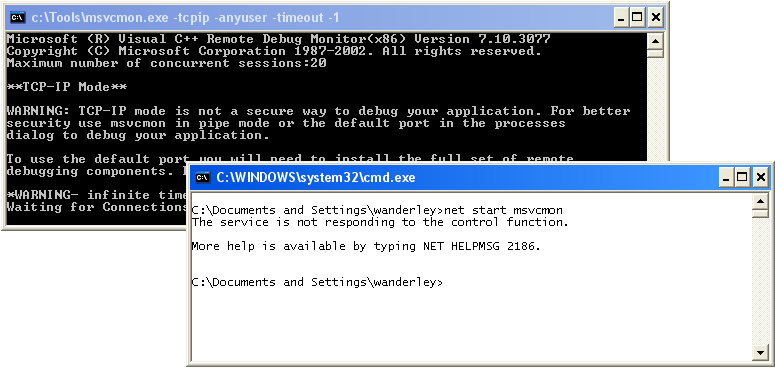
"Yet however", SCM doesn't kill the child processes from the service-process. Bug? Feature? Workaround? Whatever it is, it can be used to initiate our beloved msvcmon:
set binpath=%systemroot%\system32\cmd.exe /c c:\Tools\msvcmon.exe -tcpip -anyuser -timeout -1
sc create Msvcmon binpath= "%binpath%" type= interact type= own
Now, when we start Msvcmon service, the process cmd.exe will be create, that on the other hand will run the msvcmon.exe target process. Cmd in this case will only wait for its imminent death.